Customers · Self-storage
Run a Tighter Facility After the Office Closes
Most facilities already have a gate keypad and cameras. We keep what works, layer AI detection and cloud management on top, and give you searchable records when a tenant questions what happened at their unit.

Common challenges
Where Storage Operators Lose Control
Shared codes and after-hours visits
Gate codes get passed around, cars tailgate through, and people stay on site long after access hours.
Tenant disputes and claims
When a tenant says their unit was entered, you need gate logs and video, quickly and in one place.
Climate-controlled buildings
HVAC trouble can damage stored goods before anyone notices, especially at unstaffed sites.
Capabilities
Gate, Video, and Sensors Working Together
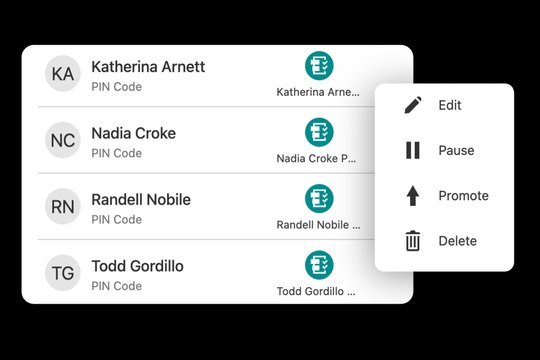
Gate codes managed per tenant
Give each tenant a unique code, set access hours, and suspend a code when an account goes delinquent. We work with your existing keypad and gate operator wherever they’re compatible.
- Unique codes per tenant, staff member, and vendor
- Access-hour schedules
- Suspend and restore codes from the app
- Gate events logged by user and time

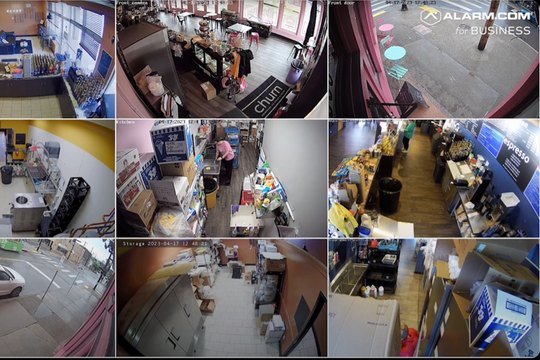
AI video on drive aisles and fence lines
Person and vehicle detection on supported cameras, with after-hours rules for drive aisles, fence lines, and RV and boat parking.
- After-hours person and vehicle alerts
- Audio talk-down on supported cameras
- Searchable footage by time and location
- Multi-site viewing for regional managers

Gate, door, and climate alerts
Sensors on gates, office doors, and select unit doors report when they open. Temperature and humidity sensors watch climate-controlled buildings.
- Gate held-open and forced alerts
- Office and back-door monitoring
- Unit-door contacts where the door type allows
- Temperature and humidity alerts for climate-controlled space

Coverage for expansions and problem lots
New phases, outdoor parking, and trouble spots can be covered with mobile surveillance before permanent cameras are run.
- Solar and cellular operation
- AI detection with lights and audio deterrence
- Relocatable as the site changes
Illustrative scenario
After Hours at a Connected Facility
How the pieces work together overnight. Times and events are illustrative.
Access hours end
Tenant gate codes stop working until morning; staff and on-call codes still work.
Vehicle in a drive aisle
AI detects a car after hours; audio talk-down plays on supported cameras and the on-call manager gets the clip.
Building C runs warm
A temperature sensor in a climate-controlled building alerts maintenance before goods are at risk.
A tenant questions an entry
The manager pulls the gate log and video for that row and time, and exports both to the account file.
Recommended solutions
Solutions for Self-Storage
Start with the capability that solves your most expensive problem, then add the rest on the same platform.

Access Management
Keyless entry, mobile credentials, smart locks, and remote door control with a full event history.
Learn more →Video Monitoring
AI person and vehicle alerts, plain-language video search, doorbells, and intercoms.
Learn more →
Safety & Security
Intrusion alarms, environmental sensors, and video-verified alerts with monitoring options.
Learn more →
Energy Management
Smart thermostats, vacant-unit schedules, automation rules, and HVAC alerts.
Learn more →
Smart Property Platform
One integrator and one dashboard for access, video, alarms, sensors, and smart-home devices.
Learn more →More on storage
Read the story After Hours at a DFW Self-Storage Facility, or see our self-storage AI retrofit overview.
Retrofit-first
Keep What Works. Layer Smart Capability on Top.
Powerhouse Guardians focuses on retrofitting and enhancing existing security infrastructure with AI integration. We keep the cameras, readers, panels, and cabling you’ve already invested in when they’re compatible and in good condition — and add only what’s missing. No rip-and-replace required.
How we work
From Property Walk to Ongoing Support
Property walk & system review
We document what’s installed — cameras, readers, panels, wiring, and network — and how your team operates.
Design & scope
Itemized keep / enhance / add recommendations, with one-time installation and monthly service quoted together.
Install & integrate
Licensed technicians handle cabling through cloud setup, scheduled around residents and staff.
Configure & train
Roles, schedules, alerts, and access plans configured for your team, plus hands-on staff training.
Support & optimize
Ongoing service, device-health checks, and tuning as your portfolio and policies change.
FAQ
Common Questions
Can you work with our existing gate keypad?
Often. We check the keypad, gate operator, and controller during the site walk. Compatible equipment stays; we replace only what can’t be integrated.
Can gate access follow our facility management software?
Some access platforms integrate with facility management software; availability depends on both systems. We confirm it during design, and otherwise staff manage codes in the app.
Can video help with tenant disputes?
Searchable video and gate logs give you a documented record of who entered and when, which supports your review of tenant claims and insurance-review documentation.
Do you support unstaffed facilities?
Yes. Cloud management, mobile alerts, and cellular connectivity on supported devices let you run sites without staff on hand.
Next step
Walk Your Facility With Us
We’ll review your gate, cameras, and access hours, show what can be retrofitted, and price installation and monthly service together.
Powerhouse Guardians Corp · info@powerhouseguardians.com · 7300 State Highway 121, Suite 300 PMB 1008, McKinney, TX 75070 · TX License #B30802201
Imagery shows representative scope; platform screens are illustrative. Features vary by platform, device, and plan. Alarm.com is a trademark of its owner.